

Sub-Total: $0.00
FAQs About Our Energy Load Management Device
i. How are load calculations typically done using the simpleSwitch 240
How does simpleSwitch affect electrical load calculations?
The way an electrical load is calculated depends on which installation method is used with simpleSwitch. The Canadian Electrical Code (CEC) provides guidance for both scenarios under Section 8-106 – Use of Demand Factors.
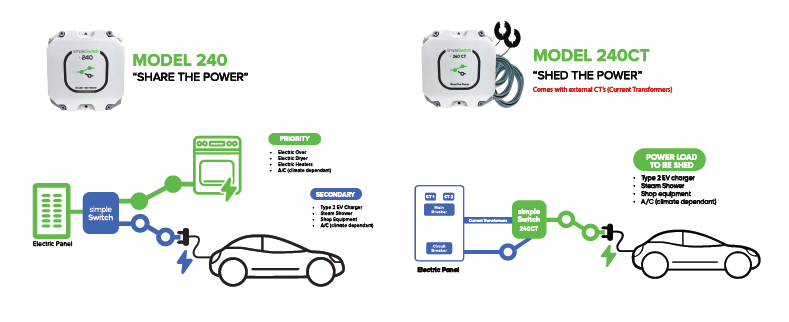
Installation Method 1 – Branch Circuit Sharing (simpleSwitch Model 240)
With Branch Circuit Sharing, simpleSwitch ensures that only one connected load can operate at a time.
Under CEC Section 8-106, when two or more loads are installed such that only one can be used at any one time, only the load with the greatest demand is used when determining the calculated electrical load.
Example:
- Range (Priority device): 42 amps
- EV charger (Secondary device): 48 amps
For load-calculation purposes, the EV charger at 48 amps would be used, since it represents the larger of the two loads.
Installation Method 2 – Feeder Monitoring (simpleSwitch Model 240CT)
With Feeder Monitoring, simpleSwitch continuously monitors the total electrical load of the home and automatically disconnects the connected device when overall usage reaches 80% of the home’s electrical capacity.
Because the connected load is actively managed and shed when required, it is typically not included in the electrical load calculation.
Example:
- EV charger connected to simpleSwitch Model 240CT: 48 amps
In this case, the 48-amp EV charger would generally not be counted toward the calculated electrical load.
This approach is supported under CEC Section 8-106 – Use of Demand Factors. However, depending on the type of controlled load (for example, non-EV equipment) and the local Authority Having Jurisdiction (AHJ), inspectors in different jurisdictions may not allow certain 240-volt loads to be excluded from the load calculation.
Note
Always confirm load-calculation requirements with the local electrical inspector or Authority Having Jurisdiction. The 2024 Canadian Electrical Code was not updated from the 2021 edition to explicitly name all 240-volt equipment types as load exclusions in the same manner that electric vehicle charging equipment is specifically identified.
In this regard, Installation Method 1, Branch Circuit Sharing may be a preferred method for installing your energy management system if your local inspector does not view other 240 volt appliances (e.g. resistive heaters, or heat pump, or A/C's) as reasonably similar in nature or has concerns with the Feeder Monitoring installation method.
ii. How are load calculations typically done using the simpleSwitch 240CT
When calculating the electrical load draw on a panel there are 2 methods of calculation depending on the model of simpleSwitch.
For the model 240, the higher of the two electrical loads is to be used for the load calculation.
For model 240CT, the device is typically not required to be counted towards the load calculation.
Check with local electrical authorities prior to purchasing product on jurisdictional code for calculating loads.
iii. Why set the charge rate on the Electric Vehicle Supply Equipment (EVSE) a.k.a. the car charger, and not the car itself
- It is very important that installer sets the car charger device PRIOR to plugging charger into the car (as damage to simpleSwitchTM may result if car charger device is not properly set).
- Electric Vehicle Supply Equipment (EVSE) (or home chargers) have settings that must be configured on the EVSE (not the car) prior to charging with simpleSwitch.
- The reason is that some vehicles remember the last charge and will try to draw the maximum charge possible. We want to limit the current running through the simpleSwitch to under 50 Amps. This is achieved by setting the charge rate on the EVSE.
- Simply stated, EV chargers must be set to a maximum of 48 Amps charging.
iv. Setting dip switches on the simpleSwitch 240 model – for devices with a motor and high demand temporary initial load
When using the simpleSwitch 240 there may be a need to set a delay to match the surge current duration.
This is only applicable for electrical devices with a long surge current, such as older air conditioners with rusty bearings, or other electrical devices with a motor load surge current over two seconds.
This only applicable when your appliance is connected as the Secondary ports of the simpleSwitch 240 (does not apply to the Priority).
-
The suggestion is to start at a 4-second delay (position 2). In the event that the *simpleSwitch 240 *switches off the Secondary during the start of the AC motor (Power Surge) then set the delay to 8-seconds (position 3). In the event that *simpleSwitch 240 *still switches off the Secondary device during the start of the AC motor (Power Surge) then the device being connected to the simpleSwitch 240 may not be suitable for the simpleSwitch 240. Please contact technical support at (206) 494-3260 Ex 701.
-
Set the dip switches according to the table below to set the time delay:

v. Projects - Examples & Solutions
Energy Load management Projects
- Building Type: 1960's Home
- Project: A/C Install
- Panel Size: 70 Amp
- Solution: simpleSwitch Model 240CT With external Current Transformers
- Application: Power Shedding.

- Building Type: New Home Build
- Project: Two (2) A/C & Electric Heaters
- Panel Size: 200 Amp
- Solution: Three (3) simpleSwitch Model 240
- Application: Power Sharing
- Configuration 1: Priority: Heater. Secondary EV Charger
- Configuration 2: Priority: Heater. Secondary EV Charger
- Configuration 3: Priority: Heater. Secondary: A/C

- Building Type: Appartment Building
- Project: Two (2) EV Chargers each to separate meter
- Panel Size: 100 Amp
- Solution: (2) simpleSwitch Model Model 240 CT
- Application: Power Shedding
- Configuration 1: EV Charger with Tap Breaker
- Configuration 2: EV Charger with Tap Breaker
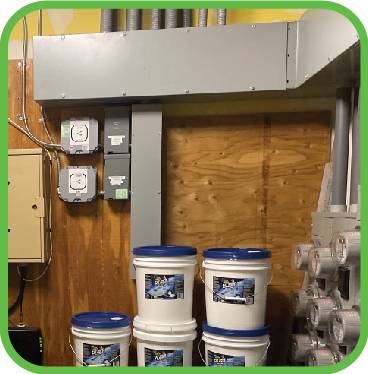

- Building Type: Apartment Building
- Project: Thirty (30) EV Chargers each to separate meter (7 Shown in Photo)
- Panel Size: 100 Amp each residence
- Solution: simpleSwitch Model Model 240 CT
- Application: Full-Panel Sensing. Shuts off EV charger if panel load >80% threshold.

vi. Will simpleSwitch work with an induction stove?
Yes. simpleSwitch can work with induction stoves, and compatibility depends on which installation method is used.
Installation Method 1 – Branch Circuit Sharing (simpleSwitch Model 240)
With Branch Circuit Sharing, simpleSwitch detects when the induction stove (the Priority device) is drawing power and temporarily turns off the Secondary device.
Most induction stoves draw a small amount of standby power when turned off. simpleSwitch typically works well with stoves that draw less than 250 watts in standby mode. Some induction stoves draw higher standby power, which may cause simpleSwitch to switch off the Secondary device.
To improve compatibility, simpleSwitch software was updated in Fall 2025 to increase the Priority load detection threshold. With this update, induction stove models that draw up to 400 watts in standby mode can now be used successfully.
Installation Method 2 – Feeder Monitoring (simpleSwitch Model 240CT)
With Feeder Monitoring, simpleSwitch monitors the total electrical load of the entire home and automatically switches off the controlled device when overall usage reaches 80% of the home’s electrical capacity.
While this method works reliably from a technical standpoint, it switches all power to the connected appliance. If the induction stove includes electronics such as a clock or control memory that require continuous power, those settings will reset when power is interrupted. This can be inconvenient for homeowners.
Recommended Installation Method for Induction Stoves
For induction stoves, Installation Method 1 – Branch Circuit Sharing is recommended. This method maintains continuous power to the stove’s electronics while still managing overall electrical load effectively.
vii. Will simpleSwitch work with a hot tub?
Yes. simpleSwitch can work with a hot tub and will function as intended as a switching device, provided that neither appliance individually exceeds the 50-amp rating of the simpleSwitch.
Hot tub compatibility depends on which installation method is used and how the hot tub behaves when power is interrupted.
Installation Method 1 – Branch Circuit Sharing (simpleSwitch Model 240)
Branch Circuit Sharing often pairs a large range (Priority device) with a hot tub (Secondary device).
In this configuration, simpleSwitch is designed to switch the Secondary device fully OFF whenever the Priority device is drawing more than 400 watts. When the Priority device stops drawing power, simpleSwitch restores power to the hot tub.
There are no functional issues with the simpleSwitch itself when used this way. However, some hot tubs may exhibit behaviors that homeowners should consider:
1) Extended Priority usage
If the Priority device is used for a long period (for example, extended cooking times), the hot tub will remain off for that entire duration. While the risk is generally low, in cold weather this could increase the chance of water temperature drop and, in extreme cases, freeze risk.
2) Hot tub temperature reset after power interruption
Some (not all) hot tubs reset to a default safety temperature after a power interruption. When power is restored, the hot tub may only heat to this lower temperature (for example, ~70°F) rather than returning automatically to its normal operating temperature (such as 102°F). Manual adjustment may be required.
These considerations relate to the hot tub’s control system, not to the operation of simpleSwitch.
Installation Method 2 – Feeder Monitoring (simpleSwitch Model 240CT)
With Feeder Monitoring, simpleSwitch monitors the total electrical load of the home and automatically disconnects the hot tub when overall usage reaches 80% of the home’s electrical capacity.
From a technical standpoint, this method works reliably with hot tubs. However, because power to the hot tub is fully interrupted when load shedding occurs, the same considerations apply:
- The hot tub may remain off during extended periods of high household electrical load.
- Some hot tubs may reset their heating setpoint after a power interruption.
Choosing the Right Installation Method
simpleSwitch will operate correctly using either installation method with a hot tub.
In some installations, the homeowner may not have a choice in how power is connected due to limitations such as an existing full electrical panel with no space for additional breakers. In these cases, Installation Method 1 – Branch Circuit Sharing may be required.
The appropriate installation method depends on:
How the hot tub responds to power interruptions
The homeowner’s tolerance for temporary shutdowns or manual temperature resets
Typically, Installation Method 2 causes less inconvenience, as household electrical demand does not often exceed 80% of the main panel’s capacity. When it does, simpleSwitch performs its intended demand-side management function, automatically limiting power usage and helping avoid costly electrical service upgrades.
If you have questions about hot tub compatibility or selecting the best installation method for your home, please contact
simpleSwitch Technical Support at (825) 777-7577.
Installation Instructions:
a. simpleSwitch 240 - click here to download PDF
b. simpleSwitch 240CT - click here to download PDF
c. simpleSwitch 240 - La procedure d’installation
d. simpleSwitch 240CT - Manuels d’installation
Specification Sheets:
a. simpleSwitch 240 - click here to download PDF
b. simpleSwitch 240CT - click here to download PDF
c. simpleSwitch 240 - cliquez ici pour les spécifications
d. simpleSwitch 240CT - cliquez ici pour les spécifications
How simpleSwitch 240 works to
"SHARE THE POWER" between 2 appliances:
Play Video
simpleSwitch 240
Wiring, connections & termination strip explained:
Professionals With Questions
"*" indicates required fields